
Touch UI / Author UI trong AEM 6.5
Nguồn học chính: Touch UI | Luca Nerlich. Note này viết lại bằng tiếng Việt để mình ôn và áp dụng cho AEM 6.5 on-premise.
Ý chính cần nhớ
Touch UI là tên cũ. Tên chính thức của giao diện authoring "modern" (post Classic UI) là Author UI.
Trong AEM 6.5 trở đi, Author UI là giao diện duy nhất được Adobe support cho việc tác giả nội dung. Classic UI đã bị remove hoàn toàn, nên mọi customisation UI phải build trên nền Author UI.
Classic UI (ExtJS)        →  removed
Touch UI / Author UI → default + duy nhất trong AEM 6.5Author UI được dựng trên 2 layer:
| Layer | Vai trò |
|---|---|
| Granite UI (server-side, Sling) | Đọc dialog XML, render HTML markup với Coral classes |
| Coral UI 3 (client-side, Web Components) | Enhance HTML thành interactive widgets trong browser |
Nói ngắn: viết dialog XML là làm việc với Granite UI, viết JS cho dialog là làm việc với Coral UI.
Add Styles Plugin vào RTE
Một use case phổ biến của Author UI customisation là thêm Styles Plugin vào Rich Text Editor (RTE). Plugin này cho phép author chọn một đoạn text và áp dụng một CSS class đã định nghĩa sẵn. AEM sẽ wrap selection bằng <span> với class đó.
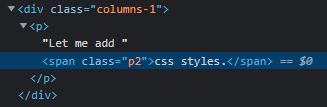
<span class="your-defined-class">your text selection</span>Result mong muốn
Sau khi cấu hình, dialog RTE sẽ có thêm dropdown Styles:
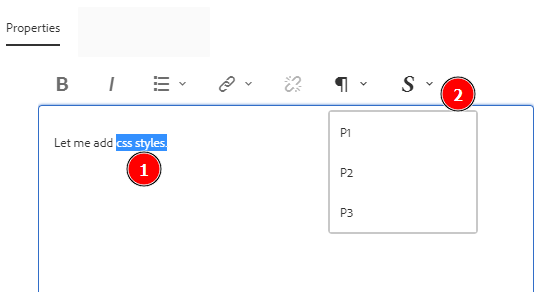
Khi author chọn một đoạn text rồi pick style, HTML output sẽ là:
Setup từng bước
Ví dụ dưới đây extend Text Core Component v2 (core/wcm/components/text/v2/text). Sling Resource Merger sẽ tự pull các node còn lại từ dialog gốc, nên overlay của mình chỉ cần chứa node liên quan đến Styles Plugin.
Tham khảo:
Bước 1: Tạo component extend Text Core
File: apps/myproject/components/text/.content.xml
<?xml version="1.0" encoding="UTF-8"?>
<jcr:root xmlns:jcr="http://www.jcp.org/jcr/1.0"
          xmlns:cq="http://www.day.com/jcr/cq/1.0"
          xmlns:sling="http://sling.apache.org/jcr/sling/1.0"
    jcr:primaryType="cq:Component"
    jcr:title="Text with Styles"
    sling:resourceSuperType="core/wcm/components/text/v2/text"
componentGroup="content"/>Bước 2: Thêm node styles vào rtePlugins
Trong apps/myproject/components/text/_cq_dialog/.content.xml, thêm node styles vào rtePlugins:
<rtePlugins jcr:primaryType="nt:unstructured">
    <styles
        jcr:primaryType="nt:unstructured"
        features="*">
        <styles jcr:primaryType="cq:WidgetCollection">
            <p1
                jcr:primaryType="nt:unstructured"
                cssName="p1"
                text="P1"/>
            <p2
                jcr:primaryType="nt:unstructured"
                cssName="p2"
                text="P2"/>
            <p3
                jcr:primaryType="nt:unstructured"
                cssName="p3"
                text="P3"/>
        </styles>
    </styles>
</rtePlugins>| Property | Ý nghĩa |
|---|---|
cssName | CSS class được apply lên selection |
text | Label hiển thị trong dropdown Styles |
features="*" | Bật toàn bộ feature của plugin |
Bước 3: Add #styles vào toolbar
Cả inline toolbar và fullscreen toolbar đều phải có #styles thì button mới hiện:
<inline
    jcr:primaryType="nt:unstructured"
    toolbar="[format#bold,format#italic,format#underline,#justify,#lists,links#modifylink,links#unlink,#paraformat,#styles]">
    <!-- [...] -->
</inline>Bước 4: Add styles vào popovers
Popover định nghĩa cách hiển thị danh sách styles dưới dạng pulldown:
<popovers jcr:primaryType="nt:unstructured">
    <styles
        jcr:primaryType="nt:unstructured"
        items="styles:getStyles:styles-pulldown"
        ref="styles"/>
</popovers>items="styles:getStyles:styles-pulldown" là ID của command trả về danh sách styles, dạng UI là pulldown.
Bước 5: Định nghĩa CSS class
Các class p1, p2, p3 phải được định nghĩa trong site clientlib để render đúng ở cả author preview lẫn publish:
.p1 { font-size: 1.25rem; font-weight: 600; }
.p2 { font-size: 0.875rem; font-style: italic; }
.p3 { font-size: 0.75rem; color: #999; }Full example dialog
Toàn bộ dialog apps/myproject/components/text/_cq_dialog/.content.xml:
<?xml version="1.0" encoding="UTF-8"?>
<jcr:root xmlns:jcr="http://www.jcp.org/jcr/1.0"
          xmlns:nt="http://www.jcp.org/jcr/nt/1.0"
          xmlns:cq="http://www.day.com/jcr/cq/1.0"
          xmlns:granite="http://www.adobe.com/jcr/granite/1.0"
          xmlns:sling="http://sling.apache.org/jcr/sling/1.0"
    jcr:primaryType="nt:unstructured"
    jcr:title="Text with Styles"
    helpPath="https://www.aemcomponents.dev/content/core-components-examples/library/page-authoring/text.html"
    sling:resourceType="cq/gui/components/authoring/dialog">

    <content
        jcr:primaryType="nt:unstructured"
        sling:resourceType="granite/ui/components/coral/foundation/container">
        <items jcr:primaryType="nt:unstructured">
            <tabs
                jcr:primaryType="nt:unstructured"
                sling:resourceType="granite/ui/components/coral/foundation/tabs"
                maximized="{Boolean}true">
                <items jcr:primaryType="nt:unstructured">
                    <properties
                        jcr:primaryType="nt:unstructured"
                        jcr:title="Properties"
                        sling:resourceType="granite/ui/components/coral/foundation/container"
                        margin="{Boolean}true">
                        <items jcr:primaryType="nt:unstructured">
                            <columns
                                jcr:primaryType="nt:unstructured"
                                sling:resourceType="granite/ui/components/coral/foundation/fixedcolumns"
                                margin="{Boolean}true">
                                <items jcr:primaryType="nt:unstructured">
                                    <column
                                        jcr:primaryType="nt:unstructured"
                                        granite:class="cq-RichText-FixedColumn-column"
                                        sling:resourceType="granite/ui/components/coral/foundation/container">
                                        <items
                                            jcr:primaryType="nt:unstructured"
                                            sling:hideChildren="[id]">
                                            <text
                                                jcr:primaryType="nt:unstructured"
                                                sling:resourceType="cq/gui/components/authoring/dialog/richtext"
                                                name="./text"
                                                useFixedInlineToolbar="{Boolean}true">
                                                <rtePlugins jcr:primaryType="nt:unstructured">
                                                    <styles
                                                        jcr:primaryType="nt:unstructured"
                                                        features="*">
                                                        <styles jcr:primaryType="cq:WidgetCollection">
                                                            <p1
                                                                jcr:primaryType="nt:unstructured"
                                                                cssName="p1"
                                                                text="P1"/>
                                                            <p2
                                                                jcr:primaryType="nt:unstructured"
                                                                cssName="p2"
                                                                text="P2"/>
                                                            <p3
                                                                jcr:primaryType="nt:unstructured"
                                                                cssName="p3"
                                                                text="P3"/>
                                                        </styles>
                                                    </styles>
                                                </rtePlugins>
                                                <uiSettings jcr:primaryType="nt:unstructured">
                                                    <cui jcr:primaryType="nt:unstructured">
                                                        <inline
                                                            jcr:primaryType="nt:unstructured"
                                                            toolbar="[format#bold,format#italic,format#underline,#justify,#lists,links#modifylink,links#unlink,#paraformat,#styles]">
                                                            <popovers jcr:primaryType="nt:unstructured">
                                                                <styles
                                                                    jcr:primaryType="nt:unstructured"
                                                                    items="styles:getStyles:styles-pulldown"
                                                                    ref="styles"/>
                                                            </popovers>
                                                        </inline>
                                                        <dialogFullScreen
                                                            jcr:primaryType="nt:unstructured"
                                                            toolbar="[format#bold,format#italic,format#underline,#justify,#lists,links#modifylink,links#unlink,#paraformat,#styles]">
                                                            <popovers jcr:primaryType="nt:unstructured">
                                                                <justify
                                                                    jcr:primaryType="nt:unstructured"
                                                                    items="[justify#justifyleft,justify#justifycenter,justify#justifyright,justify#justifyjustify]"
                                                                    ref="justify"/>
                                                                <lists
                                                                    jcr:primaryType="nt:unstructured"
                                                                    items="[lists#unordered,lists#ordered,lists#outdent,lists#indent]"
                                                                    ref="lists"/>
                                                                <paraformat
                                                                    jcr:primaryType="nt:unstructured"
                                                                    items="paraformat:getFormats:paraformat-pulldown"
                                                                    ref="paraformat"/>
                                                                <styles
                                                                    jcr:primaryType="nt:unstructured"
                                                                    items="styles:getStyles:styles-pulldown"
                                                                    ref="styles"/>
                                                            </popovers>
                                                        </dialogFullScreen>
                                                    </cui>
                                                </uiSettings>
                                            </text>
                                        </items>
                                    </column>
                                </items>
                            </columns>
                        </items>
                    </properties>
                </items>
            </tabs>
        </items>
    </content>
</jcr:root>Lưu ý các điểm quan trọng:
sling:resourceSuperTypeở component XML → kéo theo dialog gốc.sling:hideChildren="[id]"ẩn fieldidtừ parent dialog (tuỳ nhu cầu).- Cấu trúc
tabs → properties → columns → column → textphải khớp với dialog gốc, không được rút gọn.
Pitfalls thường gặp
| Vấn đề | Nguyên nhân / Cách xử lý |
|---|---|
| Button Styles không hiện trong toolbar | Thiếu #styles trong toolbar array của inline hoặc dialogFullScreen |
| Dropdown Styles trống | Thiếu node popovers/styles hoặc thiếu items="styles:getStyles:styles-pulldown" |
| Class apply nhưng không hiển thị styling | CSS class chưa load trong site clientlib, hoặc author preview không include CSS |
| Dialog mất các field khác sau khi overlay | Cấu trúc parent path không khớp với dialog gốc, Sling Resource Merger không merge được |
| Style không lưu sau khi save | Thường do RTE không nhận command; verify cssName và text đều có giá trị hợp lệ |
Checklist khi cấu hình thật
- [ ] Component có
sling:resourceSuperType="core/wcm/components/text/v2/text"(hoặc Text component có RTE). - [ ] Dialog overlay nằm đúng path
_cq_dialog/.content.xml. - [ ] Có node
rtePlugins/stylesvớifeatures="*". - [ ] Có
cq:WidgetCollectionchứa các style items vớicssName+text. - [ ]
#stylesxuất hiện trong toolbar của cảinlinevàdialogFullScreen. - [ ] Có
popovers/stylesvớiitems="styles:getStyles:styles-pulldown"vàref="styles". - [ ] CSS class được define trong site clientlib.
- [ ] Deploy package lên local AEM, test author tạo text mới và verify dropdown hiện đủ styles.
- [ ] Verify HTML output có
<span class="...">đúng class đã chọn.
See also
- Coral UI - Web components và Granite UI fields
- Overlays - Custom UI có sẵn của AEM
- Render conditions - Show/hide UI elements
- Component dialogs - Dialog field types và XML structure
- Custom Component Guide - Build component với dialog clientlibs
- Client libraries - Loading clientlibs trong author + publish